Your New Login Experience
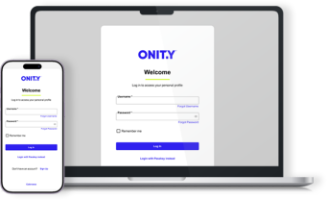
A more secure way to access your mortgage account is coming
We’re updating the way you log in to provide even stronger account protection and make it easier to access your accounts and applications.
What you need to know
Your login page will look different, but your account information will stay the same. We'll guide you through the change so you know what to expect and how to prepare.
Your login page will look different
Look for a new login experience coming soon.
You can use your existing username
If you already have an account, you don't need to create a new one. Start with your existing username and follow the prompts.
You'll complete a one-time setup
The first time you log in, we'll guide you through a few steps to create a new password, verify your identity, and confirm your information.
One login makes access easier
If you have more than one account or new loan application, you'll use one username and password to access them after you complete setup.

Get ready for the new login experience
There are a few simple things you can do now to help make your first login easier. You can also access our FAQ page for additional information.- Check your contact information
Make sure the phone number and email address in your online profile are current. We'll use the contact information associated with your account to help verify your identify. - Know your username
You can use your existing username when you start the new login experience. - Keep your account information handy
You may be asked to enter the last four digits of your account number as part of the first-time login process. You can find your account number on your billing statement or in servicing emails from us.
What to expect the first time you log in
We'll guide you through each step. Your one-time setup should take about two minutes.

Start with your username
Enter your existing username to get started or create a new one.

Verify your identity
Follow the prompts so we can confirm it's you.

Confirm your information
Review or update your information when prompted.

Create your new password
Create a password for the new login experience and continue to your account.
What's changing and what's staying the same

What's changing
- Your login page will have a new look
- You'll complete a one-time setup the first time you log in
- You'll create a new password
- You'll use a verification code when you log in
- One username and password will give you access to your accounts and applications
What's staying the same
- Your account dashboard
- Your account and payment information
- Your payment history
- Your Autopay enrollment and account alerts
- Payments that are already scheduled or processing
The way you get in is changing. The account information you rely on isn't.
Stronger protection. Simpler access.
We're making this change with you and your account security in mind.
Stronger account protection
Identity verification and verification codes provide added protection when you access your account.
Easier access
If you have multiple accounts or applications, one login will make it easier to get where you need to go.

Have questions? We have answers.
We’re updating the way you sign in to make accessing your account easier and more secure. To help make the transition to our new login process as smooth as possible, we’ve answered some of the most common questions about what’s changing and what you may experience when logging in.